Проверить ciphers в Unix/Linux
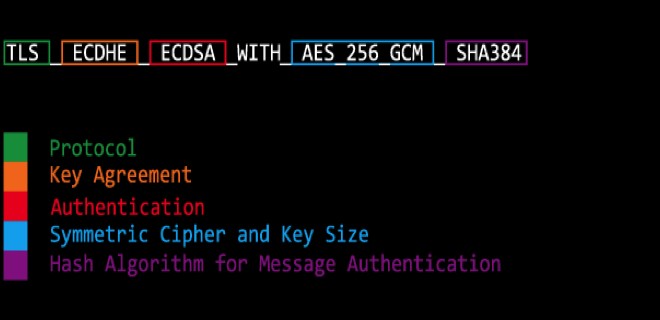
Иногда нужно проверять безопасность сайтов и ciphers к этому относятся. Ciphers — это режим шифрования или метод применения блочного шифра (алгоритма), позволяющий преобразовать последовательность блоков открытых данных в последовательность блоков зашифрованных данных. При этом для шифрования одного блока могут использоваться данные другого блока.
Проверить ciphers в Unix/Linux можно несколькими способами:
- Проверить ciphers в Unix/Linux онлайн ( через веб сайты).
- Проверить ciphers в Unix/Linux через консоль (CLI).
Кому какой удобно выбирать вам.
Проверить ciphers в Unix/Linux онлайн ( через веб сайты).
Я не буду приводить примеры таких сайтов, в интернете можно найти их! И тем более, через консоль, куда приятнее проверять и работать.
Проверить ciphers в Unix/Linux через консоль (CLI).
Имеется несколько способов сделать данную проверку.
Недавно нашел замечательную утилиту для проверки ciphers и она называется sslscan. Чтобы начать ее пользоваться — для начала стоит установить.
Установка sslscan в Unix/Linux
Установка довольно простая и примитивная.
Если имеется Debian/Ubuntu или любой другой deb дистрибутив, выполните:
# apt-get install sslscan
Если имеется CentOS/Fedora/Redhat или любой другой rpm дистрибутив, выполните:
# yum install sslscan
Если имеется MacOSX, то для начала устанавливаем homebrew, и после чего — выполняем:
┌(captain@Macbook)─(✗)─(01:01 PM Tue Feb 07)
└─(~)─(19 files, 1312b)─> brew search sslscan
sslscan

┌(captain@Macbook)─(✓)─(01:01 PM Tue Feb 07)
└─(~)─(19 files, 1312b)─> brew install sslscan
Использование sslscan в Unix/Linux
Для проверки используйте команду:
┌(captain@Macbook)─(✓)─(10:05 AM Wed Feb 08)
└─(~)─(19 files, 1320b)─> sslscan linux-notes.org
Version: 1.11.8
OpenSSL 1.0.2k  26 Jan 2017

OpenSSL version does not support SSLv2
SSLv2 ciphers will not be detected

Testing SSL server linux-notes.org on port 443

  TLS Fallback SCSV:
Server supports TLS Fallback SCSV

  TLS renegotiation:
Secure session renegotiation supported

  TLS Compression:
Compression disabled

  Heartbleed:
TLS 1.2 not vulnerable to heartbleed
TLS 1.1 not vulnerable to heartbleed
TLS 1.0 not vulnerable to heartbleed

  Supported Server Cipher(s):
Preferred TLSv1.2  128 bits  ECDHE-RSA-AES128-GCM-SHA256   Curve P-384 DHE 384
Accepted  TLSv1.2  256 bits  ECDHE-RSA-AES256-GCM-SHA384   Curve P-384 DHE 384
Accepted  TLSv1.2  128 bits  DHE-RSA-AES128-GCM-SHA256     DHE 4096 bits
Accepted  TLSv1.2  256 bits  DHE-RSA-AES256-GCM-SHA384     DHE 4096 bits
Accepted  TLSv1.2  128 bits  ECDHE-RSA-AES128-SHA256       Curve P-384 DHE 384
Accepted  TLSv1.2  128 bits  ECDHE-RSA-AES128-SHA          Curve P-384 DHE 384
Accepted  TLSv1.2  256 bits  ECDHE-RSA-AES256-SHA384       Curve P-384 DHE 384
Accepted  TLSv1.2  256 bits  ECDHE-RSA-AES256-SHA          Curve P-384 DHE 384
Accepted  TLSv1.2  128 bits  DHE-RSA-AES128-SHA256         DHE 4096 bits
Accepted  TLSv1.2  128 bits  DHE-RSA-AES128-SHA            DHE 4096 bits
Accepted  TLSv1.2  256 bits  DHE-RSA-AES256-SHA256         DHE 4096 bits
Accepted  TLSv1.2  256 bits  DHE-RSA-AES256-SHA            DHE 4096 bits
Accepted  TLSv1.2  128 bits  AES128-GCM-SHA256
Accepted  TLSv1.2  256 bits  AES256-GCM-SHA384
Accepted  TLSv1.2  128 bits  AES128-SHA256
Accepted  TLSv1.2  256 bits  AES256-SHA256
Accepted  TLSv1.2  128 bits  AES128-SHA
Accepted  TLSv1.2  256 bits  AES256-SHA
Preferred TLSv1.1  128 bits  ECDHE-RSA-AES128-SHA          Curve P-384 DHE 384
Accepted  TLSv1.1  256 bits  ECDHE-RSA-AES256-SHA          Curve P-384 DHE 384
Accepted  TLSv1.1  128 bits  DHE-RSA-AES128-SHA            DHE 4096 bits
Accepted  TLSv1.1  256 bits  DHE-RSA-AES256-SHA            DHE 4096 bits
Accepted  TLSv1.1  128 bits  AES128-SHA
Accepted  TLSv1.1  256 bits  AES256-SHA
Preferred TLSv1.0  128 bits  ECDHE-RSA-AES128-SHA          Curve P-384 DHE 384
Accepted  TLSv1.0  256 bits  ECDHE-RSA-AES256-SHA          Curve P-384 DHE 384
Accepted  TLSv1.0  128 bits  DHE-RSA-AES128-SHA            DHE 4096 bits
Accepted  TLSv1.0  256 bits  DHE-RSA-AES256-SHA            DHE 4096 bits
Accepted  TLSv1.0  128 bits  AES128-SHA
Accepted  TLSv1.0  256 bits  AES256-SHA

  SSL Certificate:
Signature Algorithm: sha256WithRSAEncryption
RSA Key Strength:    2048

Subject:  linux-notes.org
Altnames: DNS:linux-notes.org, DNS:www.linux-notes.org
Issuer:   WoSign CA Free SSL Certificate G2

Not valid before: Mar 10 02:31:47 2015 GMT
Not valid after:  Mar 10 02:31:47 2017 GMT

┌(captain@Macbook)─(✓)─(10:06 AM Wed Feb 08)
└─(~)─(19 files, 1320b)─>
PS: так же можно указать любой другой порт для проверки:
$ sslscan linux-notes.org:80
Замените 80-й порт на любой другой. Для помощи, используйте:
┌(captain@Macbook)─(✓)─(10:07 AM Wed Feb 08)
└─(~)─(19 files, 1320b)─> sslscan -h
                   _
           ___ ___| |___  ___ __ _ _ __
          / __/ __| / __|/ __/ _` | '_ \
          \__ \__ \ \__ \ (_| (_| | | | |
          |___/___/_|___/\___\__,_|_| |_|


		1.11.8
		OpenSSL 1.0.2k  26 Jan 2017
OpenSSL version does not support SSLv2
SSLv2 ciphers will not be detected

Command:
  sslscan [Options] [host:port | host]

Options:
  --targets=<file>     A file containing a list of hosts to check.
                       Hosts can  be supplied  with ports (host:port)
  --sni-name=<name>    Hostname for SNI
  --ipv4               Only use IPv4
  --ipv6               Only use IPv6
  --show-certificate   Show full certificate information
  --no-check-certificate  Don't warn about weak certificate algorithm or keys
  --show-client-cas    Show trusted CAs for TLS client auth
  --show-ciphers       Show supported client ciphers
  --show-cipher-ids    Show cipher ids
  --show-times         Show handhake times in milliseconds
  --ssl3               Only check SSLv3 ciphers
  --tls10              Only check TLSv1.0 ciphers
  --tls11              Only check TLSv1.1 ciphers
  --tls12              Only check TLSv1.2 ciphers
  --tlsall             Only check TLS ciphers (all versions)
  --ocsp               Request OCSP response from server
  --pk=<file>          A file containing the private key or a PKCS#12 file
                       containing a private key/certificate pair
  --pkpass=<password>  The password for the private  key or PKCS#12 file
  --certs=<file>       A file containing PEM/ASN1 formatted client certificates
  --no-ciphersuites    Do not check for supported ciphersuites
  --no-fallback        Do not check for TLS Fallback SCSV
  --no-renegotiation   Do not check for TLS renegotiation
  --no-compression     Do not check for TLS compression (CRIME)
  --no-heartbleed      Do not check for OpenSSL Heartbleed (CVE-2014-0160)
  --starttls-ftp       STARTTLS setup for FTP
  --starttls-imap      STARTTLS setup for IMAP
  --starttls-irc       STARTTLS setup for IRC
  --starttls-ldap      STARTTLS setup for LDAP
  --starttls-pop3      STARTTLS setup for POP3
  --starttls-smtp      STARTTLS setup for SMTP
  --starttls-xmpp      STARTTLS setup for XMPP
  --starttls-psql      STARTTLS setup for PostgreSQL
  --xmpp-server        Use a server-to-server XMPP handshake
  --http               Test a HTTP connection
  --rdp                Send RDP preamble before starting scan
  --bugs               Enable SSL implementation bug work-arounds
  --timeout=<sec>      Set socket timeout. Default is 3s
  --sleep=<msec>       Pause between connection request. Default is disabled
  --xml=<file>         Output results to an XML file
                       <file> can be -, which means stdout
  --version            Display the program version
  --verbose            Display verbose output
  --no-cipher-details  Disable EC curve names and EDH/RSA key lengths output
  --no-colour          Disable coloured output
  --help               Display the  help text  you are  now reading

Example:
  sslscan 127.0.0.1
  sslscan [::1]
Использование nmap в Unix/Linux
Можно с помощью этой утилиты тоже проверить ciphers через консоль:
# nmap -sV --script ssl-enum-ciphers -p 443 linux-notes.org


Starting Nmap 7.12 ( https://nmap.org ) at 2017-02-08 10:14 EET
Nmap scan report for linux-notes.org (31.187.70.238)
Host is up (0.33s latency).
PORT    STATE SERVICE  VERSION
443/tcp open  ssl/http nginx
|_http-server-header: nginx
| ssl-enum-ciphers:
|   TLSv1.0:
|     ciphers:
|       TLS_ECDHE_RSA_WITH_AES_128_CBC_SHA (secp384r1) - A
|       TLS_ECDHE_RSA_WITH_AES_256_CBC_SHA (secp384r1) - A
|       TLS_DHE_RSA_WITH_AES_128_CBC_SHA (dh 4096) - A
|       TLS_DHE_RSA_WITH_AES_256_CBC_SHA (dh 4096) - A
|       TLS_RSA_WITH_AES_128_CBC_SHA (rsa 2048) - A
|       TLS_RSA_WITH_AES_256_CBC_SHA (rsa 2048) - A
|     compressors:
|       NULL
|     cipher preference: server
|   TLSv1.1:
|     ciphers:
|       TLS_ECDHE_RSA_WITH_AES_128_CBC_SHA (secp384r1) - A
|       TLS_ECDHE_RSA_WITH_AES_256_CBC_SHA (secp384r1) - A
|       TLS_DHE_RSA_WITH_AES_128_CBC_SHA (dh 4096) - A
|       TLS_DHE_RSA_WITH_AES_256_CBC_SHA (dh 4096) - A
|       TLS_RSA_WITH_AES_128_CBC_SHA (rsa 2048) - A
|       TLS_RSA_WITH_AES_256_CBC_SHA (rsa 2048) - A
|     compressors:
|       NULL
|     cipher preference: server
|   TLSv1.2:
|     ciphers:
|       TLS_ECDHE_RSA_WITH_AES_128_GCM_SHA256 (secp384r1) - A
|       TLS_ECDHE_RSA_WITH_AES_256_GCM_SHA384 (secp384r1) - A
|       TLS_DHE_RSA_WITH_AES_128_GCM_SHA256 (dh 4096) - A
|       TLS_DHE_RSA_WITH_AES_256_GCM_SHA384 (dh 4096) - A
|       TLS_ECDHE_RSA_WITH_AES_128_CBC_SHA256 (secp384r1) - A
|       TLS_ECDHE_RSA_WITH_AES_128_CBC_SHA (secp384r1) - A
|       TLS_ECDHE_RSA_WITH_AES_256_CBC_SHA384 (secp384r1) - A
|       TLS_ECDHE_RSA_WITH_AES_256_CBC_SHA (secp384r1) - A
|       TLS_DHE_RSA_WITH_AES_128_CBC_SHA256 (dh 4096) - A
|       TLS_DHE_RSA_WITH_AES_128_CBC_SHA (dh 4096) - A
|       TLS_DHE_RSA_WITH_AES_256_CBC_SHA256 (dh 4096) - A
|       TLS_DHE_RSA_WITH_AES_256_CBC_SHA (dh 4096) - A
|       TLS_RSA_WITH_AES_128_GCM_SHA256 (rsa 2048) - A
|       TLS_RSA_WITH_AES_256_GCM_SHA384 (rsa 2048) - A
|       TLS_RSA_WITH_AES_128_CBC_SHA256 (rsa 2048) - A
|       TLS_RSA_WITH_AES_256_CBC_SHA256 (rsa 2048) - A
|       TLS_RSA_WITH_AES_128_CBC_SHA (rsa 2048) - A
|       TLS_RSA_WITH_AES_256_CBC_SHA (rsa 2048) - A
|     compressors:
|       NULL
|     cipher preference: server
|_  least strength: A

Service detection performed. Please report any incorrect results at https://nmap.org/submit/ .
Nmap done: 1 IP address (1 host up) scanned in 56.43 seconds
Вот еще другие вариации запуска:
$ nmap -sT -PN -p 443 linux-notes.org --script ssl-enum-ciphers.nse
Вот и все, тема «Проверить ciphers в Unix/Linux» завершена.